Status
What's in flight, open, stuck, and done, at the scope you asked for. Statuses in the wild are messy; the survey keeps every raw value and adds a lifecycle bucket.
Survey · in development
Graphify maps your code. The survey maps your context-v/ folders: one command
turns every one of them in scope into a dashboard, a task list, and a map.
One repo, a whole tree of repos, or anything between.
Status
What's in flight, open, stuck, and done, at the scope you asked for. Statuses in the wild are messy; the survey keeps every raw value and adds a lifecycle bucket.
Cleanup
The empty skeletons, the stale stubs, the docs whose checkboxes are all ticked but whose status still says Draft, the missing type and the statuses that fit nothing. Listed, never edited: you clean up on purpose.
Thinking like a CTO
Which repos are moving, by commits and agent-assisted share. Which specs are signed off with nobody building them, which need a decision, which issues are ready to hand to someone.
One self-contained HTML page per view: it opens from disk, works offline, and switches between light, dark, and vibrant. Every doc has a copy path button, so you can hand it straight to an agent: "work on this one." These are real surveys of our own tree, as of late October 2026.
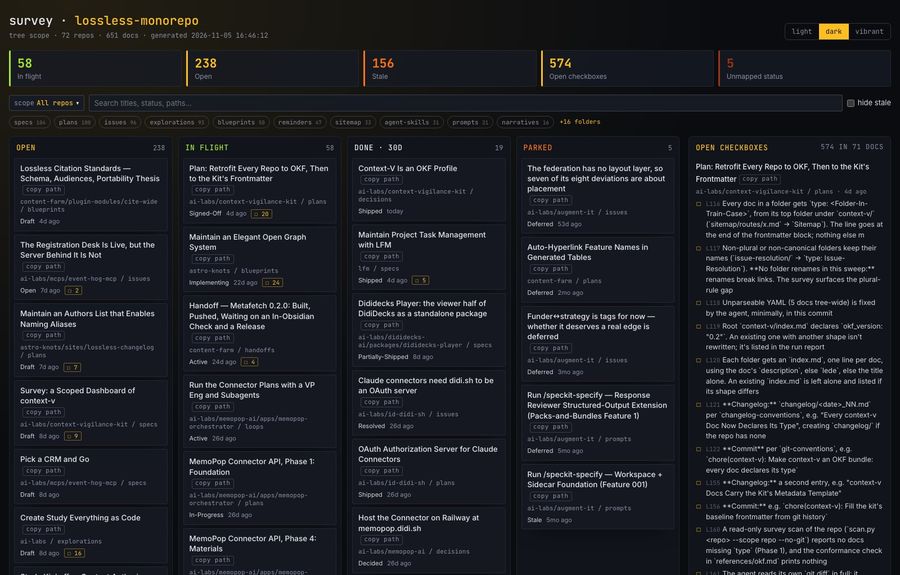
Board
Columns by lifecycle: open, in flight, recently done, parked. Beside them, every unchecked checkbox in a live plan or spec, with its line number.
Open the example: whole tree · one repo
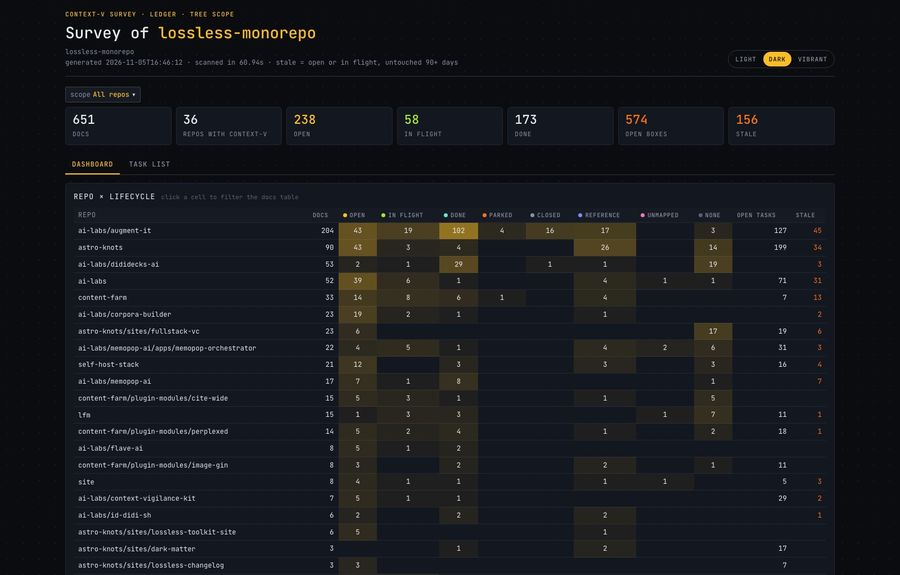
Ledger
A repo × lifecycle matrix, shaded by volume; every cell clicks through to its docs. Below it, the health panel and a filterable table of every doc.
Open the example: whole tree · one repo
Map
The tree itself: repos nested as they sit on disk, each with a status-mix bar and a freshness strip. Search opens a match's parents.
Open the example: whole tree · one repo
The whole-tree examples cover about a hundred repos and a thousand docs. Links in them point at files on our own laptop; the copy-path buttons still work.
Scope comes from where you run it, plus one flag. A repo is any folder with a
.git, so submodules count, and each context-v/ belongs to the nearest
repo above it.
--scope repo
Repo
One repo's context-v/, child repos left out. A status page for one project.
--scope tree
Tree
A repo and every repo below it. Run at the top of a tree of repos, it is the global view.
--scope lineage
Lineage
A repo and every repo above it: what the parents decided that governs this one.
--repos a,b,c
Pick
Just the repos you name: the handful relevant to today's work.
The survey will ship as /cv:survey. Until then it's three Python scripts on the
kit's development branch, standard library only:
From a clone of the kit
Scan. Writes survey.json to context-v/extra/survey/, which the practice already gitignores.
python3 agent-skills/survey/scripts/scan.py ~/code/your-repo
SURVEY.md: the same picture, sized for an agent to read.
python3 agent-skills/survey/scripts/report.py <that survey.json>
The Board page. spike_ledger.py and spike_map.py make the other two.
python3 agent-skills/survey/scripts/spike_board.py <that survey.json>
Useful flags
--scope and --repos pick the scope. --no-git skips
commit history (faster; no momentum). --public drops private docs and
absolute paths, for a page you'll publish.
Read the spec or the source. The three pages are spikes, being merged into one.